


NewsDetails
How to test if a pulse controller board is faulty?
author:yiheng time:2026-03-17 10:46:27 click:172
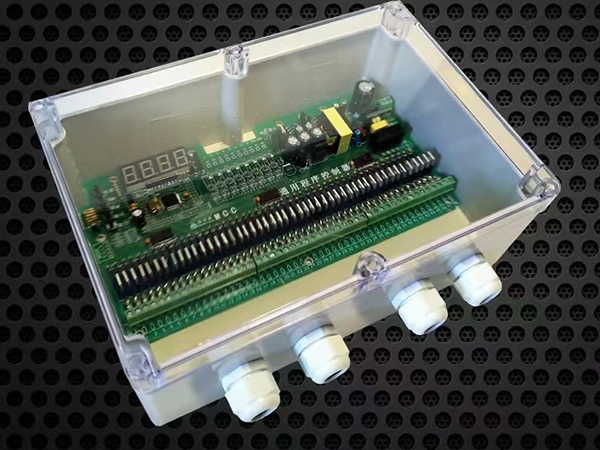
Testing a pulse controller board for faults involves a systematic approach,moving from simple visual checks to electrical measurements and functional tests.The goal is to isolate whether the problem lies with the controller itself,the connected solenoid valves,or the power supply.A logical,step-by-step process will help you accurately diagnose the issue.
Initial Visual and Power Checks
Before diving into complex electrical testing,it is essential to verify the basics.Many apparent controller failures are actually caused by external factors.
1.Inspect Power Supply and Indicators
The first thing to check is whether the controller is receiving power.Look for any indicator lights on the board,such as a power LED.If there are no lights,the issue is likely with the incoming power.Use a multimeter to verify that the correct voltage(e.g.,24V DC,110V AC)is present at the controller's input terminals.An unstable power supply can cause the controller to have no response or to repeatedly restart.If the power is stable but the controller is unresponsive,the internal power supply module on the board itself may have failed.
2.Perform a Visual Inspection of the Board
With the power disconnected,open the control panel and carefully examine the controller board.Look for obvious physical damage such as burnt components,bulging or leaking capacitors,cracked solder joints,or broken traces.Check all wiring connections to ensure they are tight and free of corrosion.A loose wire or a poor connection can mimic a controller failure.
3.Verify Input Power to Solenoid Valves
A common point of confusion is mistaking a wiring or valve problem for a controller failure.Locate the output terminals on the controller that send power to the solenoid valves.Using a voltmeter,check if the correct voltage is present at these terminals during the moment a pulse should be fired.If you have voltage at the controller output but the valve does not click,the problem is likely with the wiring to the valve or the valve itself,not the controller.
Testing Controller Output and Components
If the power supply and wiring appear sound,the next step is to test the controller's ability to generate and switch the output signals.
1.Check for Drive Signals
The controller's primary job is to send an electrical signal to fire the solenoid valves.To test this,you will need to put the controller into a manual test mode if one is available.Many controllers have a function that allows you to trigger each output channel individually.
With the controller in test mode,use a multimeter to check for voltage at the output terminals for a specific channel when it should be active.If there is no voltage,the output relay or the driving circuit on the board for that channel may be faulty.You can also listen for an audible click from the output relays on the board when they are supposed to activate.The absence of a click suggests a problem with the relay or its control circuit.
2.Measure Solenoid Valve Coils
If a specific row of bags is not cleaning,the issue could be a burned-out solenoid coil.Disconnect power and the wiring from the solenoid valve.Use a multimeter to measure the resistance(impedance)across the coil's terminals.A healthy solenoid coil will typically have a resistance reading within a specific range,such as 20-40 ohms.A reading of infinite resistance indicates an open(burned-out)coil that needs replacement.A reading of zero indicates a short circuit.If the coil is bad,it may have damaged the controller's output circuit,so retest the controller after replacing the valve.
3.Inspect Output Relays
The output relays are the electromechanical or solid-state switches on the controller board that complete the circuit to the solenoid valves.These are wear items.A failed relay may have burnt or pitted contacts.In some cases,you can swap the wiring from a suspected faulty channel to a known working channel on the controller.If the problem moves to the new channel,the original output relay on the board is likely bad.
Verifying Settings and Sensors
Sometimes the controller appears to be working,but the system does not operate correctly because of incorrect settings or sensor failures.
1.Review Parameter Settings
Incorrectly programmed parameters can make a controller seem faulty.Check the pulse width(on-time)and the interval between pulses(off-time).An excessively long pulse width,for example,can waste air and may even damage solenoid valves,while a setting that is too short will not clean effectively.Ensure these settings match the recommendations for your specific baghouse and valve type.
2.Test Pressure Sensors(for On-Demand Controllers)
If your system uses a demand-based(differential pressure)controller,the cleaning sequence is triggered by signals from a pressure sensor.If the controller is not initiating cleaning,the sensor itself could be faulty or its tubing could be blocked.You can test this by using the controller's manual mode to force a cleaning cycle.If manual cleaning works,the controller is likely fine,and you should troubleshoot the pressure sensor and its impulse lines.
By following this systematic approach—checking power,inspecting for damage,testing outputs,and verifying settings—you can accurately pinpoint whether the pulse controller board is the source of the problem or if the fault lies elsewhere in the system.
GB/T 7714:
FAVALLI M,METRA C.Testing resistive opens and bridging faults through pulse propagation[J].IEEE Transactions on Computer-Aided Design of Integrated Circuits and Systems,2009,28(6):915-925.
MLA:
Favalli,Michele,and Cecilia Metra."Testing Resistive Opens and Bridging Faults Through Pulse Propagation."IEEE Transactions on Computer-Aided Design of Integrated Circuits and Systems,vol.28,no.6,2009,pp.915–925.
APA:
Favalli,M.,&Metra,C.(2009).Testing resistive opens and bridging faults through pulse propagation.IEEE Transactions on Computer-Aided Design of Integrated Circuits and Systems,28(6),915–925.
 Recommended Products


 Contact Us
—— Hotline:+86 15028642444
—— Email:523474198@qq.com
—— Whatsapp:+8615028642444
—— Address:Longfengdian Village, Waliwang Town, Botou City, Hebei Province


